Every business eventually faces the same question: what should we do with outdated tech? From retired laptops and forgotten smartphones to bulky servers gathering dust, dealing with old devices is more than a matter of clearing storage space. IT Equipment Disposal is about doing the right thing, for your data, your business, and the planet.
This blog takes a practical look at how IT equipment disposal works and why it matters. Whether you’re tackling printer recycling, server disposal, or looking into hard drive shredding, we’ll guide you through secure, sustainable, and compliant ways to get rid of your old tech.
Why IT Equipment Disposal Should Be on Your Radar
Data Doesn’t Disappear on Its Own
You might think deleting files is enough but it’s not. Every device, from a laptop to a printer, holds data. Without proper IT equipment disposal, you risk sensitive information falling into the wrong hands. Think customer data, financials, or internal files. That’s why secure disposal methods like hard drive shredding aren’t optional, they’re essential.
It’s the Law (Seriously)
Laws like GDPR, the WEEE Directive, and the Data Protection Act demand that businesses dispose of electronics responsibly. Computer disposal isn’t just about tossing tech; it’s about following clear, traceable processes. If you don’t, you could face big fines and reputational damage.
Green Credentials Matter
With e-waste piling up globally, sustainable IT equipment disposal has become a badge of honour for businesses. Proper disposal means fewer devices in landfills and more materials recycled. It’s not just good for the planet, it shows your stakeholders you care.
Types of IT Equipment You Can Dispose of (and How to Do It Right)
Not all tech is equal when it comes to disposal. Here’s how to handle the main culprits.
Server Disposal: Don’t Let Old Infrastructure Come Back to Bite You
Servers hold massive volumes of sensitive data. Before you recycle one:
- Use hard drive shredding or degaussing for any onboard storage.
- Overwrite residual data.
- Request a certificate of destruction.
Reputable ITAD partners will also recycle server components like fans, power supplies, and metal cases.
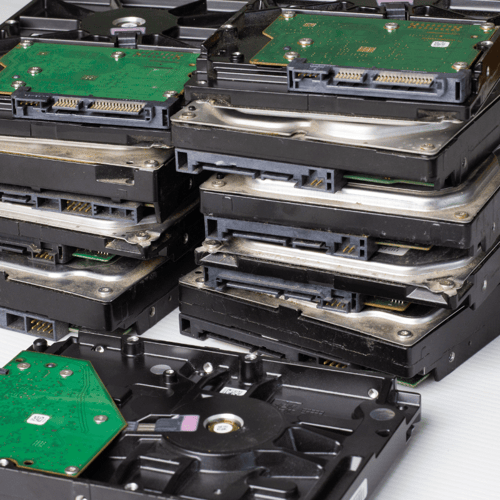
Hard Drive Shredding: Peace of Mind in Tiny Pieces
Formatting a drive? Not enough. Data can often be recovered unless the drive is physically destroyed.
Hard drive shredding ensures that information is completely unrecoverable. Whether it’s on-site or off-site, make sure the shredding process is certified and monitored.
Laptop Recycling: Small Devices, Big Responsibilities
Laptops contain solid-state drives (SSDs), which are tricky to wipe. To dispose of them securely:
- Encrypt and securely wipe SSDs.
- Remove batteries (they require special recycling).
- Refurbish what you can and recycle the rest.
Laptop recycling not only helps protect data but supports circular IT practices.
Computer Disposal: Desktop Devices Deserve Respect Too
Even if they’re no longer your workhorse, desktops still contain sensitive data. When managing computer disposal:
- Dismantle and recycle usable parts.
- Safely dispose of hazardous materials like lead or mercury.
- Use approved ITAD providers to keep things compliant.
Smartphone Recycling: Don’t Underestimate These Pocket-Sized Threats
Company phones store emails, messages, and sometimes sensitive logins.
- Factory reset isn’t enough, also remove SIM and memory cards.
- Log out of all accounts.
- Choose smartphone recycling services that track serial numbers and issue disposal certificates.
Rare earth metals from phones can be recovered, reducing environmental impact.
Network Device Disposal: Clear the Way for Secure Connectivity
From firewalls to routers, these devices may store access credentials and system configurations.
- Reset devices to factory defaults.
- Document everything for traceability.
- Ensure proper network device disposal and recycling of metals like copper and aluminium.
Printer Recycling: More Than Just Toner and Paper
Multifunction printers (MFPs) can store copies of scanned documents. Before recycling:
- Wipe or destroy internal hard drives.
- Recycle ink and toner responsibly.
- Choose partners experienced in printer recycling to handle plastics, metals, and boards.
Tablet Disposal: Lightweight But Not Low-Risk
Tablets often connect to business systems and store app data.
- Perform a full factory reset.
- Remove and safely dispose of batteries.
- Use certified tablet disposal services to prevent data leaks and environmental harm.
What a Secure IT Equipment Disposal Process Looks Like
Want to get disposal right? Follow a structured process:
- Audit Your Assets: Log every device due for disposal.
- Destroy Data Securely: Use hard drive shredding or verified digital wiping.
- Certified Collection: Only work with vetted ITAD providers.
- Process and Recycle: Maximise what can be reused or reclaimed.
- Get the Paperwork: Always ask for certificates of destruction and disposal.
This not only protects your company but also prepares you for audits and CSR reporting.
Choosing the Right ITAD Partner for IT Equipment Disposal
Your ITAD provider should be more than just a vendor, they should be a partner in risk reduction and sustainability.
Look for providers who:
- Are certified (ISO 27001, WEEE, GDPR, ADISA)
- Offer a full chain of custody
- Provide both on-site and off-site options
- Have strong sustainability credentials (low landfill rates, high recovery rates)
Ask for case studies, process documentation, and recycling statistics. A good partner will be happy to share.
Final Thoughts: Make IT Equipment Disposal a Business Essential
Disposing of old tech isn’t a chore to be pushed down the list. It’s a key part of managing risk, meeting compliance, and reducing your environmental footprint.
From server disposal to tablet disposal, every device needs the right send-off. When done properly, IT equipment disposal helps protect your data, the planet, and your peace of mind.